Getting Started
EaseWeb allows you to communicate with a database to store any information permanently. Store data purely using JS without any hassle! No DB/Server code is required.
To start, the following script needs to be included at the start of yout html file:
<script>var ew_app = "USERNAME";</script>

<script src="//easeweb.ikigaisys.com/assets/js/jquery.min.js"></script>

<script src="//easeweb.ikigaisys.com/assets/js/ew.js"></script>
This will modify the HTML and make the magic happen. Each app has a "username" which is the URL of your app. Find my username/URL
What is all of this?
The best place to start is the Getting Started with pictures to get you started step by step on how to create an App and get its URL.
After making an application, you can test everything in this guide in the Playground.
Available API functions
The first step is to know what data you want to place and where. This is done through "tables". Click on "Tables" tab in the left menu.
Here we are creating a table called "contact_us".

Please create a Table "contact_us" before trying this (Read "Creating a Table" section)
var to_insert = {
    name: "Test",
    email: "test@gmail.com",
    message: "This is my message!",
};

ew.insert("contact_us", to_insert)
    .then(d => {
        console.log(d);
    })
    .catch(e => {
        console.log(d);
    });
Try demo in the Playground
Please create a Table "contact_us" before trying this (Read "Creating a Table" section)
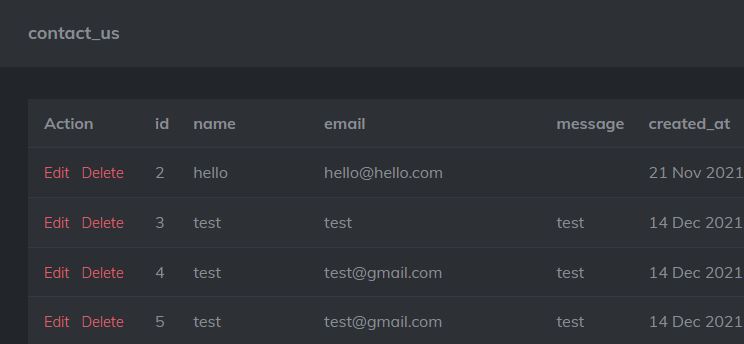
To update row id 3 you can use index='3'. Table is selected with the "table" html attribute.
var to_update = {
    name: "Test",
    email: "test@gmail.com",
    message: "This is my message!",
};

ew.update("contact_us", 3, to_update)

    .then(d => {
        console.log(d);
    })
    .catch(e => {
        console.log(d);
    });
Try demo in the Playground
The parameters are: table_name, index, success_function, failure_function (optional)
ew.remove("contact_us", 3)
    .then(d => {
        console.log(d);
    })
    .catch(e => {
        console.log(d);
    });
Try demo in the Playground
Please create a Table "contact_us" before trying this (Read "Creating a Table" section)
The parameters are: table_name, index/filter, success_function, failure_function (optional)
ew.fetch_first("contact_us", 2)
    .then(d => {
        console.log(d);
    })
    .catch(e => {
        console.log(d);
    });
Instead of index, you can also use a filter. (filters are described below separately)
var filter = { "where": [ {"id": { ">=": 1 } } ] };

ew.fetch_first("contact_us", filter)
    .then(d => {
        console.log(d);
    })
    .catch(e => {
        console.log(d);
    });
Try demo in the Playground
Please create a Table "contact_us" before trying this (Read "Creating a Table" section)
The parameters are: table_name, index/filter (optional), success_function, failure_function (optional)
ew.fetch_all("contact_us")
    .then(d => {
        console.log(d);
    })
    .catch(e => {
        console.log(d);
    });
This will get all rows, however you can also define and use a filter. (filters are described below separately)
var filter = { "where": [ {"id": { ">=": 1 } } ] };

ew.fetch_all("contact_us", filter)
    .then(d => {
        console.log(d);
    })
    .catch(e => {
        console.log(d);
    });
A simple function that will call the callback function with null if the user isn't logged in, or the user object if logged in
ew.get_user()
    .then(d => {
        console.log(d);
    })
    .catch(e => {
        console.log(d);
    });
Calling this will redirect to the login page and attempt to login (if the user is already logged in, nothing happens)
Additional options
Initializing these variables before adding the ew.js script will modify the ew.js behavior
ew_time_fix: (default true) The columns created_at and updated_at are fetched in unix seconds by default, this will convert those to local js time automatically if true
ew_autologin: (default true) If permission denied is received from the server, and the user is not logged in, this will automatically redirect to login and return back to current page
Modifiers can be added to ew-data-first and ew-data-all to fetch specific data, you can either use the index html attribute or the filter html attribute.
Filter can be used as follows
{
    "where": [{"id": {">=": 1}}]
}


{
    "where": [{"id": 1}],
    "order_asc": "id",
    "page": 0,
    "count": 10
}
- Where: A list of conditions to apply
- Order asc/dsc: Sort the result ascending or descending based on a column
- Page: Instead of getting everything at once, split to pages and get Nth page
- Count: Maximum number of records to get
Sample fetching using filter:
var filter = { "where": [ {"id": { ">=": 1 } } ] };

ew.fetch_all("contact_us", filter).then(data => console.log(data));
Setup a React App
You can also setup a React App or Angular App.